ttrek 1.4.0: build cleanly, keep what you need
ttrek 1.4.0 is here! Successful installs and updates now clean up their
source files and build directories automatically. Need those files for a closer
look? The new -keep flag leaves them in place.
Compiling a package needs more than the finished program: downloaded archives, unpacked source code, patches, and intermediate build files all take up space. Once installation succeeds, most of that material has done its job. ttrek now clears it away while keeping your installed packages, build logs, and generated install scripts.
A community website, with less left behind
The example-community package brings together accounts, a forum, a wiki, and a blog. Its dependencies include Tcl, OpenSSL, Tink, and several AWS SDK services: a useful real-world example of how much space a source build can leave behind.
We compared two separate environments using ttrek 1.4.0, each with
example-community and its 40 dependencies: one with -keep, the other
with default cleanup. Both installed the same package versions.
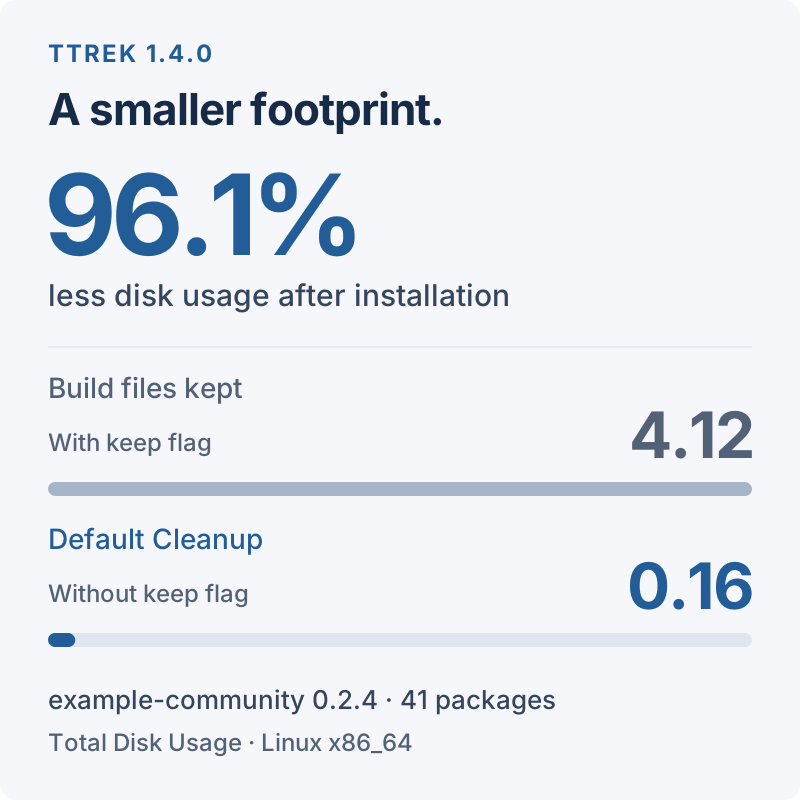
The result: 4.12 GiB with build files kept, down to 0.16 GiB (about 164 MiB)
with default cleanup. That frees 3.96 GiB, a 96.1% reduction in the
space occupied by the complete ttrek-venv directory.
| Disk usage | With flag | Default |
|---|---|---|
| Total | 4.12 GiB | 0.16 GiB |
| Build | 4,059.5 MiB | 5.1 MiB |
| Installed | 109.7 MiB | 109.7 MiB |
Build is ttrek-venv/build, including the retained logs and install scripts.
Installed is ttrek-venv/local. The total also includes metadata and
rollback history. The installed packages occupy essentially the same space;
the saving comes from clearing away the build materials.
Measured on November 14, 2026, on Ubuntu 26.04, Linux x86_64, using default
package options and this registry snapshot.
We used du -s -B1 ttrek-venv after each successful install. Figures are rounded
in binary units (GiB and MiB); savings will vary by platform and dependency
versions. These figures describe space retained after installation. Compilation
still needs temporary working space while it runs.
Keep the build when you need it
For an ordinary install, use the same command as before:
ttrek install -y example-community
To preserve the downloaded archives, extracted sources, patches, and build
directories, add -keep:
ttrek install -y -keep example-community
It works with updates too:
ttrek update -y -keep
-keep applies to that invocation. It is useful when you want to inspect
generated files, investigate a compiler warning, or work on a package recipe.
It does not bring back files already removed by an earlier install, and an
already-installed package is not rebuilt just because you add the flag. Use
-force as well when you need to rebuild a package and retain its build files:
ttrek install -y -force -keep example-community
That rebuilds the named package and any installed packages that depend on it; unchanged dependencies are not rebuilt automatically.
What gets cleaned up?
Without -keep, each successfully installed package's private sources,
patches, and build directory are removed as it finishes. Shared source trees
and downloaded archives stay available until the whole operation succeeds,
including any project build and post-install hook. Then those caches are
removed too.
This builds on the shared sources introduced in ttrek 1.3.0: packages can reuse one source tree during installation, then release that space when the work is done.
The files you need afterward stay in place:
- Installed programs and libraries remain in
ttrek-venv/local. - Build logs and generated install scripts remain under
ttrek-venv/build. - A failed package's sources and build files remain for investigation; shared caches are retained if the operation fails.
- Your root project's own sources and build directory are unaffected.
A command with nothing to install, or an installation plan you decline, does not clear out previously retained caches. Updating ttrek itself does not retroactively clean existing environments.
Get ttrek 1.4.0
Release binaries are available for Linux amd64 and arm64, with glibc and musl builds, and for macOS. Update ttrek, then check the installed version:
ttrek self-update
ttrek version
New to ttrek? Follow Getting started, then try building a website.