Understanding ttrek-venv directory
ttrek-venv is the directory of a project's isolated virtual environment.
It contains the programs, Tcl packages, native libraries, and build files that
ttrek manages for that project. By default, ttrek creates this directory inside
your project, alongside ttrek.json and ttrek-lock.json.
Each project has its own environment. Two projects can use different versions of Tcl or the same library without replacing each other's installed copies. Your application source and persistent data live alongside the environment.
How the files are organized
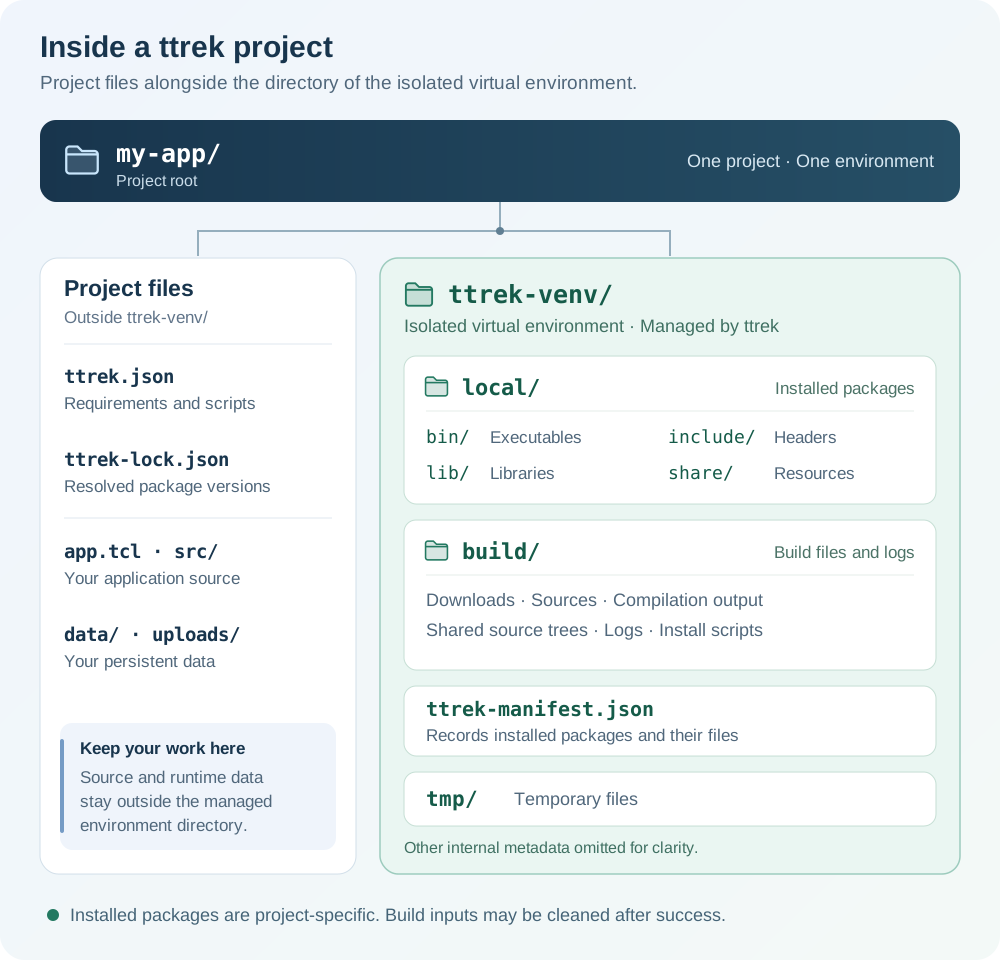
The environment belongs to one project. Keep application code and persistent
data outside ttrek-venv.
The main paths have distinct purposes:
| Path | What it contains |
|---|---|
ttrek.json |
Project metadata, direct dependencies, development dependencies, and project scripts. |
ttrek-lock.json |
Resolved package versions, dependencies, and registry selection. |
ttrek-venv/local/ |
The installation prefix: the directory under which packages install their files. |
ttrek-venv/local/bin/ |
Installed executables, such as tclsh9.1. |
ttrek-venv/local/lib/ |
Installed libraries and Tcl package directories. |
ttrek-venv/local/include/ |
Header files used when compiling native dependencies. |
ttrek-venv/local/share/ |
Package resources and other shared installation data. |
ttrek-venv/build/ |
Downloads, extracted sources, compilation files, generated install scripts, and logs. |
ttrek-venv/ttrek-manifest.json |
Installed package versions, file lists, build settings, dependencies, and package scripts. |
ttrek-venv/tmp/ |
Temporary files used by ttrek, including generated scripts for execution. |
The exact contents depend on the packages installed and the progress of a build. Some directories appear only when needed; others are cleaned after a successful installation.
What isolation means
In the default project mode, package installation and updates target that
project's ttrek-venv/local directory. Updating a library in my-app leaves
the copy installed in another project's environment alone.
Packages within one project share the same installation prefix. This includes direct dependencies, their dependencies, and the project's development dependencies. ttrek resolves compatible versions for that project's dependency graph; it does not create a separate virtual environment for every package.
The isolation concerns package installation and command lookup. Processes use the host operating system and run with your normal permissions and filesystem access. Build tools can still come from your existing system installation.
Create and populate the environment
For a new project:
mkdir my-app
cd my-app
ttrek init -y
ttrek install -y tcl@9.1.0 tjson
ttrek init creates the project specification, lockfile, and environment
directories. ttrek install resolves the requested packages and their
dependencies, builds them as needed, and installs their files under local/.
For an existing project that already has ttrek.json, install its declared
dependencies from the project directory:
ttrek install -y
The specification, lockfile, and manifest serve different roles. The specification says what the project requires; the lockfile records the selected versions; the manifest records what is installed in this environment. Copying a lockfile into a fresh checkout does not install the packages. ttrek checks the installed manifest and its recorded files when deciding what needs installation or rebuilding.
Run programs in the environment
Use ttrek run to run a command with the project's installed packages:
ttrek run tclsh9.1
At the Tcl prompt, you can load the package installed above:
package require tjson
puts [package present tjson]
There is no separate activation step. For the command it launches, ttrek run
places ttrek-venv/local/bin first on PATH, sets LD_LIBRARY_PATH to
ttrek-venv/local/lib, and provides two absolute paths:
| Variable | Meaning |
|---|---|
PROJECT_HOME |
The project directory containing ttrek.json. |
PROJECT_INSTALL_DIR |
The project's ttrek-venv/local directory. |
Commands start with ttrek-venv/local as their working directory. To run an
application file in the project root, pass its absolute path. For example,
from the project root, after creating app.tcl:
ttrek run tclsh9.1 "$PWD/app.tcl"
Within Tcl code, use PROJECT_HOME to locate project files and persistent
data independently of the working directory:
set data_dir [file join $::env(PROJECT_HOME) data]
file mkdir $data_dir
set database_file [file join $data_dir app.sqlite3]
The environment settings apply to the launched command and its children. Your calling shell keeps its existing settings when the command finishes.
Build files, shared sources, and cleanup
ttrek-venv/build holds the files used to produce installed packages. Downloads
go under build/download, private sources under build/source or
build/named-source, and compilation output under build/build. Package build
logs are kept under build/logs/<package>-<version>/.
Recipes that share the same source archive can reuse a prepared source tree
under build/shared-source. For example, several packages built from one SDK
can reuse its extracted sources while keeping their own compilation output.
Shared sources remain within the project's environment; another project has
its own directory. These prepared trees are read-only, with generated build
files kept separately.
After a package installs successfully, ttrek normally removes its private sources, patches, and compilation directory. Shared sources and downloads are removed after the whole operation succeeds. Build logs and generated install scripts remain. Failed packages retain their source and build files, and failed operations retain shared caches for investigation.
To retain build inputs and intermediate files for an installation or update,
use -keep:
ttrek install -keep -y tjson
ttrek update -keep -y
This applies to that invocation. An operation that has nothing to rebuild does not recreate source files already removed by an earlier successful build.
Keep project files and data outside the environment
Keep application source, configuration, database files, and uploads outside
ttrek-venv. For example, use src/, data/, and uploads/ in the project
root. Package operations manage the environment's contents, so edits to
installed files can be replaced during updates or reinstallation.
Track the project specification and application source in version control.
Keep ttrek-lock.json with the project when you want other checkouts to use
the same selected versions. Exclude the generated environment by adding this
entry to your project's .gitignore:
/ttrek-venv/
ttrek also maintains internal environment history under
ttrek-venv/.ttrek-git for rollback. Let ttrek manage that history; keep your
application's repository at the project level.
For a fresh checkout or another machine, install dependencies using the project files instead of relying on a copied environment. Native binaries depend on the target platform, and installed files may contain absolute paths. The lockfile preserves version choices; rebuilding still requires the relevant registries, sources, and build tools.
See Getting started for setup and Managing packages for dependency and update commands.
Experimental user and global environments
Both ttrek install and ttrek update also accept -u and -g.
These flags are experimental. -u selects a user environment, and -g
selects a global environment. Use the same mode when installing and updating:
# Experimental user environment
ttrek install -u tcl
ttrek update -u tcl

# Experimental global environment
ttrek install -g tcl
ttrek update -g tcl
For the isolated project environment described in this guide, omit both flags.